Foreman: a secure self-hosted agent orchestrator
LLM Agents
Giving a modern LLM root access to a computer allows it to do a lot of things that were previously unthinkable.
You can give a hard problem that requires intense focus and iterations to an LLM agent, and it will solve it for you. This moment may not last, but right now they are clearly worse than humans in some respects, but much better in others. If you work hand-in-hand you can harness the unique strengths of both.
A couple examples:
I asked an agent without internet access to change the background color of an image. It tried to
pip install Pillow, but given there was no internet, that failed. So instead it wrote a PNG parser from scratch and changed the background color. Then it verified the result and sent it to me. It took 4 minutes.I had an agent spend half an hour investigating an issue another agent encountered, finding a CA certificates issue where X.520 limits the CommonName field to 64 characters, and send me a fix. That would have taken me hours to do.
The main blocker to unlocking the full potential of delegating complex tasks to agents is the friction / iteration pain. If how you iterate is by asking questions to a LLM, it telling you what to do, and then you pasting in the result in the chat, you are wasting your time.
- Instead, you want agents to be fully autonomous. That means two things:
they need root access to act
they need access to your data to know
This is where OpenClaw shines and why it attracted so much excitement: if you give an agent your computer & your data, it’s truly a different experience. The agent can work on its own, effortlessly pulling information from many places. It can extend itself to create new capabilities from nowhere if you just ask. Heck, if you have an issue it can even debug & fix itself! And having it always available using a familiar chat, from my phone, felt like yet another level. Truly like an extremely capable personal assistant. It’s worth playing with.
The security problem
But OpenClaw is as exciting as it is insecure. It can accidentally delete your emails, or wipe your disk. And it got a lot worse when malicious actors looked into it and started creating malicious skills or trying prompt injection. Security-wise it’s a nightmare.
I personally experienced it while building Foreman, when it couldn’t attach a file I asked for in its message, so it “helpfully” started trying to upload it to random websites on the internet to share it with me.
- The fundamental security issue is the lethal trifecta: you don’t ever want to give an agent these three features simultaneously:
Access to your private data
Exposure to untrusted content
The ability to externally communicate (exfiltrate data)
Give an agent all three, and a prompt injection can make it access your private data and exfiltrate it.
So I did something a lot of people do: I ran claude --dangerously-skip-permissions, but in virtual machines.
- That allowed me to experiment, but:
it’s a far cry from the OpenClaw experience. I need to run multiple VMs depending on the data I want to give access to: so much friction. And there is no introspection, no chat integration to use from my phone.
it’s insecure! The VMs have access to internet, and often access to real secrets / API keys and some personal data. I can’t cut them off from the internet either (how would I access the LLM providers? Or my git repositories?).
While better than nothing, this solution is unsatisfactory on both fronts: security and usability.
I played with cutting off full internet access by default, while only allowing access to certain domains through auto-whitelisting of IP addresses based on DNS queries. It felt weak (IP granularity is not much especially when you whitelist cloudflare CDN IPs, VM still has access to secrets) and complicated to set up.
My requirements
I landed on a set of well-defined requirements for my needs:
Sandboxing. That’s the most obvious: I want the agents to run inside a sandbox with well-defined access to my data. Sandboxes should be short-lived, with no internal persistence. I want to treat agents like interns: any writing of data should be reviewed by me through pull requests.
Restricted network access. I want to restrict the agents’ access to the internet to prevent data exfiltration, in the most granular way possible. For example I want to allow agents to pull packages in, but not to publish new packages as they could contain our private data.
No access to secrets. That’s the cherry on the top: no agent should have direct access to passwords or API keys. In my ideal scenario, secrets would get injected in the requests by some orchestrator system. It means even if data is exfiltrated, the blast radius is much smaller.
Ease of access & parallelization. I want to be able to interact with my agents through chats. This allows for zero friction, allowing me to send text or even audio messages to an agent from my phone if I want. But there is a second benefit: running multiple sessions in parallel. I routinely run 5 agents or more in different chats, working on 5 different tasks, seamlessly.
Introspection. I also had a vague idea that I should be inspired by OpenClaw and allow the agents to have self-introspection: they should be able to see past conversations and past thoughts they had. This sounded powerful, and in retrospect this intuition proved to be a killer feature.
Self-hosted & flexible. Those agents should run easily on my machine, and I should be able to easily switch models, chat integrations, etc. No lock-in.
Existing tools & inspirations
The space is extremely hot. I did quite some research before deciding to build an Nth tool.
You have cool blog posts from companies explaining how they have great solutions internally:
Great stuff but it’s nothing you can run.
On the lighter end, closer to what I was doing, people do sandboxing with nix or similar technologies. Great for basic isolation but lacking essential features like network isolation or chat integration.
Sprites from Fly.io offers ephemeral sandboxes with no access to secrets — cool, but cloud-only, not self-hosted.
Similarly, Daytona provides fast cloud-hosted sandboxes but it’s infrastructure, not an orchestrator.
E2B is mostly a hosted service, has no session logs concept, and secrets live inside the sandboxes. Good luck self-hosting it (Terraform + Nomad + Consul + Firecracker).
OpenHands is interesting but it implements its own agent loop when the existing ones (Claude Code, OpenCode) are already good. The hard problem is network & secret isolation, not the agent loop.
Sandboxed.sh is close to what I want: it runs Claude Code in containers with a web UI. But it has no session logs, nor good internet isolation.
Docker Sandboxes runs a granular MITM proxy that injects credentials! Great. But it doesn’t handle the full lifecycle: chat integrations, session logs, profiles.
Overall, it’s clear that the sandboxing part (VM / container) is a solved issue. For my experiments I was also using Incus which is a great orchestrator allowing me to seamlessly run VMs or containers.
The “agent harness” part is also solved: Claude Code and Codex have SDKs, OpenHands is a very active project. And all of that works already.
What I felt was missing was the middle glue: how do you spin up agent sessions, and granularly control what they have access to, isolate them from secrets, build some logging for introspection, etc.
Foreman
So I decided to build my own agent orchestrator. The scope was pretty scary, especially restricting internet access, and injecting real secrets transparently. It turned out to be easier than I thought once I got the agentic flywheel going.
Foreman is a Python project that only depends on the standard Python library to run. It requires a Linux system with Incus installed.
At a high level, it’s an agent orchestrator that integrates with chat platforms or forges, and spins up containers or VMs running LLM agents, with a man-in-the-middle network proxy for fine-grained control of network access and injection of secrets.
It can run multiple agents in parallel, so you can have multiple chats where you work on different pull requests in a project.
To solve the “lethal trifecta” problem, you can run different profiles each with a different VM setup, set of injected credentials, etc.
The MITM proxy logs all network activity. That includes the LLM calls, too! The credentials to the LLMs are injected, and all thoughts, tool use, etc. are logged by the proxy.
All these logs can be introspected by agents if you make them available in their VMs. So you have detailed logs of each agent session persisted on disk, and made available to… future sessions:
It means you can ask an agent to review what past sessions struggled on,
or to find your recurring pains and change the system prompt to mitigate them!
I use it to debug internal errors, too: if an agent crashes I’d ask a new agent why, and to fix it for me.
Architecture
Getting a bit more into the details, Foreman is built around:
integrations: how you talk to the agents. These connect to chat providers, git forges, etc. You can implement your own as a python module, but if your integration needs third-party libraries (e.g. the Telegram SDK), you can run the integration itself inside a sandbox so the host stays safe & dependency-free.
profiles: when an integration spawns an agent, it uses a configured profile. The profile defines whether the agent has internet access, all the services it can connect to, if the logs of the other sessions are accessible to it, etc… Generally you would want a profile with internet access but no access to sensitive data, and another that does the reverse, to avoid the lethal trifecta.
capabilities: what an agent can do: access GitHub on your behalf (with credentials injected by the MITM proxy), access your internal knowledge base, mount a host directory, etc.
By default I ship Foreman with a couple sandboxed integrations (telegram, signal), and a web server with a minimalistic chat interface.
The agent sessions run in Incus instances, which can be either containers or VMs. Both are supported, Incus makes that easy.
These sandboxes don’t just execute tool calls. They run full-blown agentic loops of your choice. By default I ship Claude Code (which is the most mature one) and OpenCode. I don’t reinvent the wheel.
The agents are not extremely verbose, by default they only send you their final answer when they are done with their work. But then how do you know what an agent that’s been running for 20 minutes is actually doing?
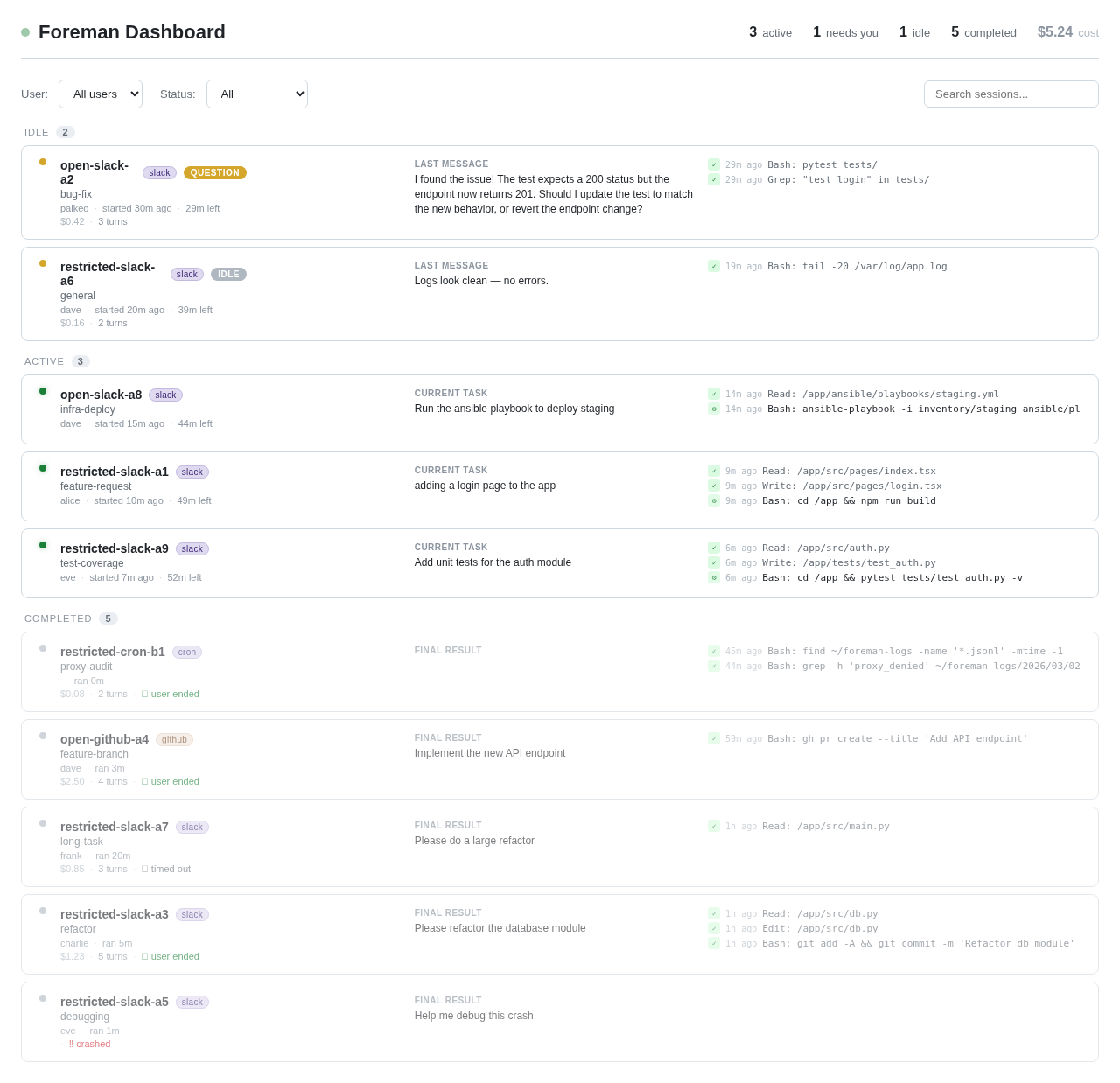
Well, Foreman ships with a web dashboard: it’s an optional independent service that reads session logs and renders active & past sessions so you can see what the agents are doing, in real-time.
Controlling network access
At first, I tried to dynamically whitelist IP addresses: when you resolve a DNS name, you whitelist the IPs in the answers. There are very good tools doing that, like Cilium which dynamically allows access to domains using eBPF. While this is cool, it doesn’t let me do credentials injection. But there is another problem I discovered:
I will likely allow github.com so that agents with access to sensitive data can pull repositories. But if I allow the whole domain it’s trivial for an agent to push data there, too!
And it gets much harder: GitHub allows for very creative side-channels to leak data. One I discovered is that an attacker can register an organisation on GitHub, and have the agent download a single file with an HTTP GET request. If the attacker includes an Authorization header with a personal access token, they can do this GET as an organization user, and then they can exfiltrate any data they want in some other HTTP headers such as User-Agent: the value of this header will get logged in the audit logs of the organization.
So at this point it was obvious that controlling network access would be hard to get right: I think preventing all side-channels is impossible.
For example an attacker could create 256 npm packages, and count the number of downloads, and leak data a byte at a time…
The MITM proxy
Even if no perfect solution exists, I wanted to do the best possible: so I needed extremely good visibility on all network traffic, including the ability to control the HTTP methods, strip headers, etc.
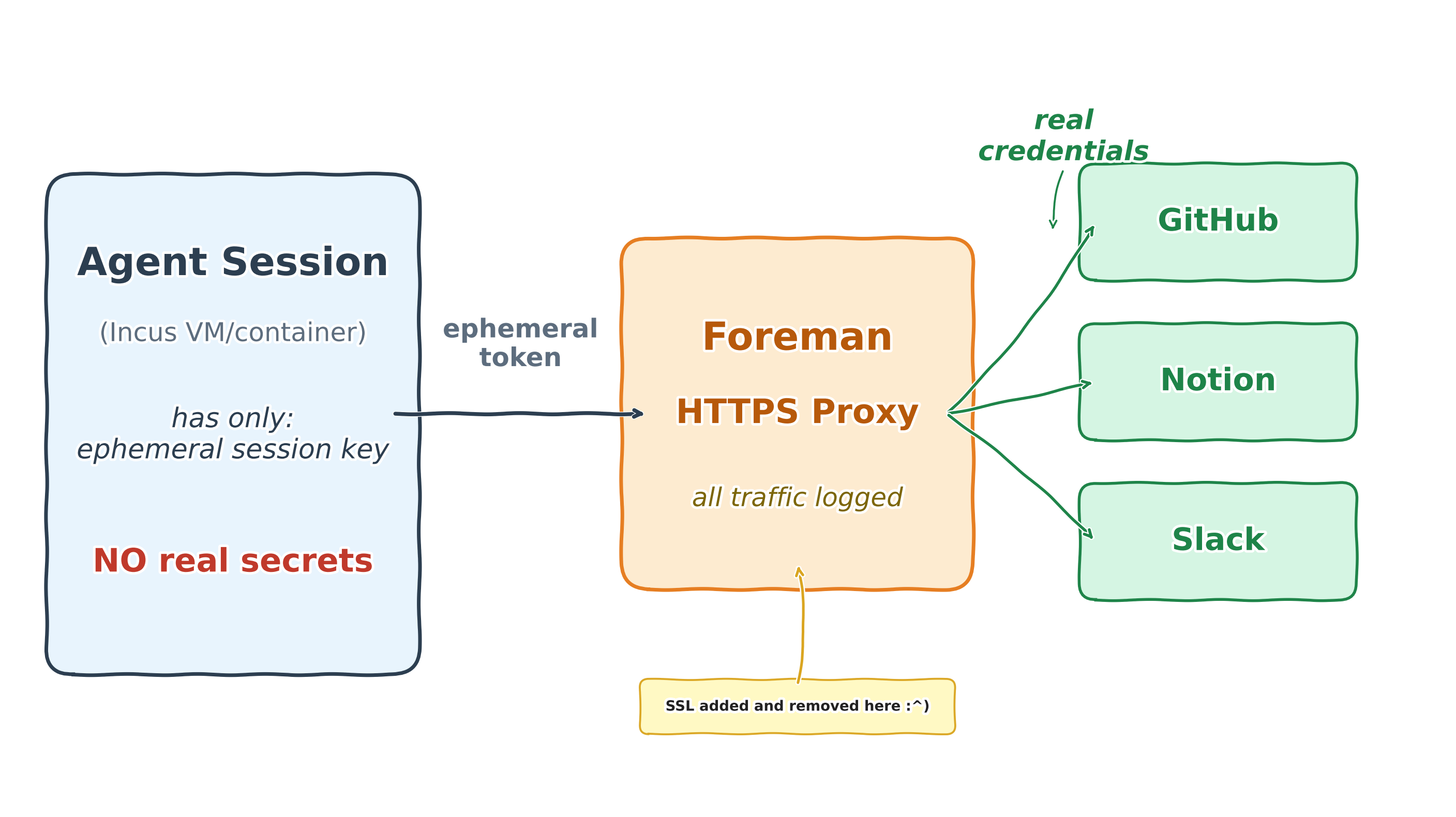
I decided to implement an HTTP/HTTPS proxy in Foreman that decrypts and re-encrypts all data.
- It solves a set of problems:
whitelisting specific URLs, very granularly (you can
GETondomain.com/packages/*but notPOSTthere),giving agents access to private accounts (logging in to GitHub, or to my wiki), while NOT letting them access the secrets,
logging all requests for introspection & debugging.
The proxy intercepts all traffic, and lets capabilities hook into it. This way they can inject the real authentication headers, but also log details about every request. That means agents don’t have access to any secret (other than an ephemeral session key), and all activity gets logged.
Agents with internet can bypass the proxy. But if they do, they won’t get credentials injected, so they still need the MITM proxy to access any personal account.
Agents without internet can only access a whitelist of URLs. I filter the HTTP method, the domain, the path, and strip all headers except those on a whitelist. Particular care was given to avoiding HTTP request smuggling.
The proxy is always used, at least to inject the correct credentials to the LLM endpoint, and log all LLM calls and intermediate thoughts.
How I use it
I have two profiles:
open, for research that requires internet access, but no access to sensitive data.
restricted, that has no internet access, but it has access to my databases, my personal notes, the foreman repo, etc. I use this one the most.
Like interns, my agents have read-only access to things, and if they want to change anything, it goes through a review process. For git, they cannot push and have to send me pull requests.
But I think the most powerful feature is the ability to go “meta”:
If a session crashes, the session logs are designed to contain all of the info allowing to debug it. So I simply ask a new agent to debug the session that crashed and send the fix in a pull request.
I can ask an agent to review last week’s sessions, find what the agents struggled on, and send PRs to Foreman to improve it accordingly.
I have a cron job set up to send me a weekly review of all sessions to summarize what I’ve been working on during the past week.
This meta approach extends to Foreman development itself: I have agents do all the work for me.
Let’s illustrate with the Foreman integration tests: I have tests for setting up VMs, making sure the network isolation works, that agents are able to clone private repositories, etc.
So I started by running them manually on the host machine. That means a tedious loop where I describe the failure to agents, and let them suggest fixes that I have to test again.
Now, I have agents install Incus & Foreman in their VMs (thanks to nested virtualization). Then, the inner Foreman replaces all of the ephemeral keys of the inner sessions by its outer ephemeral key, and proxies the traffic to… the outer Foreman! Two layers of proxying, allowing Foreman agents to run & fix the Foreman integration tests. I call it Foreman-in-Foreman :)
I was able to build the Foreman core in a weekend, and then I used Foreman itself to develop the rest of the code through MRs.
Try it yourself!
The Foreman I published is only a starting point, by design. Extend it, modify it, make it your own :)
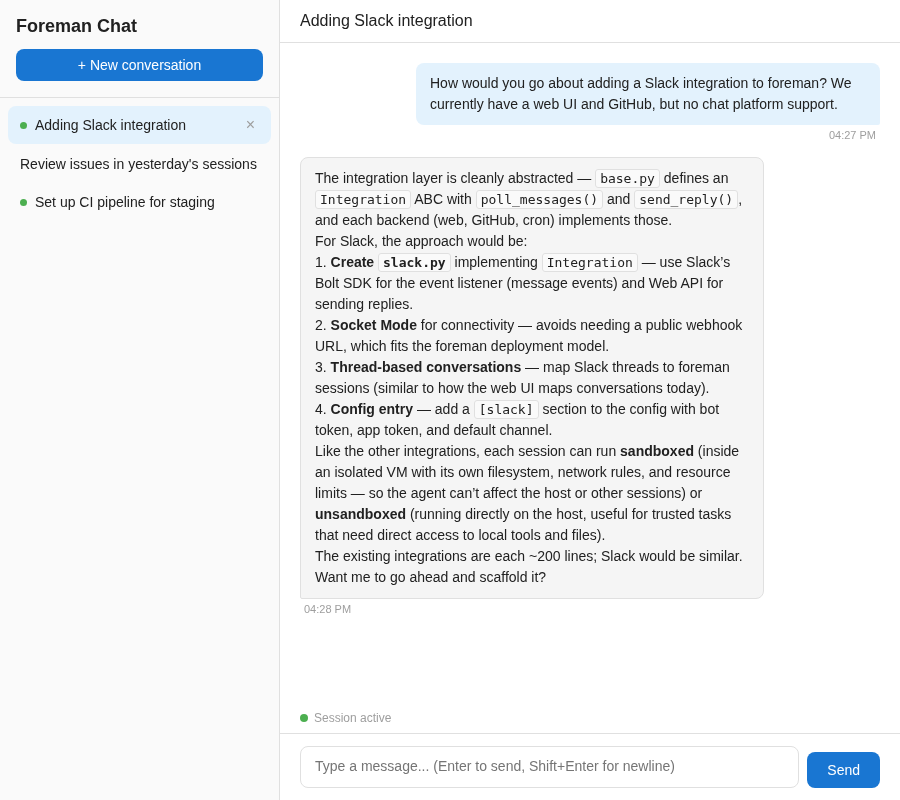
The configuration lives alongside the code. Agents have full visibility into the codebase, the profiles, the proxy rules, etc. That means you can ask an agent to add a new integration, or wire up a service you need. I developed most of Foreman this way, and you can too!
Clone the repo, install it, and spin up the web server. Then start talking to an agent, and let it shape Foreman into what you need!
Thanks to Mr. Fish for the detailed review.